

The real estate technology (PropTech) sector is witnessing a significant advancement in how short-term rental investment models are developed and deployed, thanks to the introduction of Mashvisor’s Lookup API. This innovative data solution addresses long-standing challenges within Airbnb revenue modeling, namely the pervasive issues of inaccurate rental data, the unreliability of web scraping methods, and the complexity of inconsistent revenue calculations. By providing complete, pre-modeled financial metrics in a single API call, the Lookup API streamlines the development process for PropTech firms, eliminating the need for manual data cleaning, scraping infrastructure, or custom calculation engines.
Addressing the Pain Points of Short-Term Rental Data
For developers and data scientists working in the PropTech space, building robust financial models for short-term rentals, particularly on platforms like Airbnb, has historically been a labor-intensive and error-prone undertaking. The core difficulties stem from the dynamic nature of the short-term rental market and the fragmented, often unstructured, data available.
- Dirty Rental Data: Publicly available data scraped from rental platforms is frequently incomplete, contains errors, or reflects outdated information. This "dirtiness" necessitates extensive cleaning and validation, consuming valuable development time and resources.
- Unreliable Scrapers: Building and maintaining web scrapers capable of consistently extracting accurate data from dynamic websites like Airbnb is a significant technical challenge. Scrapers are prone to breaking due to website updates, leading to data gaps and unreliable insights.
- Inconsistent Revenue Calculations: Different platforms and developers may employ varying methodologies for calculating key financial metrics such as monthly revenue, occupancy rates, average daily rates (ADR), and revenue per available room (RevPAR). This inconsistency hinders comparability and can lead to flawed investment decisions.
The Mashvisor Lookup API directly confronts these challenges by offering a production-ready solution that delivers pre-modeled financial metrics. This means developers can integrate comprehensive financial data into their applications with minimal effort, accelerating the deployment of investor dashboards, valuation engines, and automated underwriting workflows.
Streamlining Investor Dashboards and PropTech Applications
A prime example of the Lookup API’s utility is in building investor dashboards. A developer can now fetch critical financial metrics for any U.S. market, including monthly revenue, occupancy rates, and estimated expenses, with a single API request. This eliminates the complex backend work previously required, making the Lookup API one of the most efficient property data APIs available to PropTech teams. The ability to access such detailed, pre-calculated data dramatically reduces the time-to-market for new PropTech products and enhances the accuracy of existing ones.
This guide is designed to walk developers through the process of transforming a single response from the Lookup API into a complete and actionable Airbnb revenue model. It covers the core components of the model, the data inputs, expense breakdowns, financing considerations, and the crucial aspect of data quality assurance.
The Core Engine: Why the Lookup API Stands Out
The fundamental value proposition of the Mashvisor Lookup API lies in its ability to serve as the "core engine" for Airbnb revenue modeling. Instead of developers needing to build this engine from scratch, Mashvisor provides it as a service, pre-loaded with sophisticated logic and up-to-date market data. This approach allows PropTech firms to focus on their unique value proposition and user experience, rather than on the intricacies of data acquisition and financial modeling.
API Coverage: Global Reach for Diverse Markets
The Lookup API boasts extensive geographical coverage, ensuring its applicability across a wide range of investment strategies. It provides data for all 50 U.S. states, offering granular insights into local rental markets. Furthermore, its international reach extends to key global markets, including:
- Great Britain (GB)
- Canada (CA)
- Spain (ES)
- Australia (AU)
- United Arab Emirates (AE)
- France (FR)
- South Africa (ZA)
- Saudi Arabia (SA)
- Greece (GR)
This broad coverage enables investors and PropTech companies to analyze short-term rental opportunities across diverse economic and regulatory landscapes.
Summary: A Production-Grade Data Pipeline for Underwriting
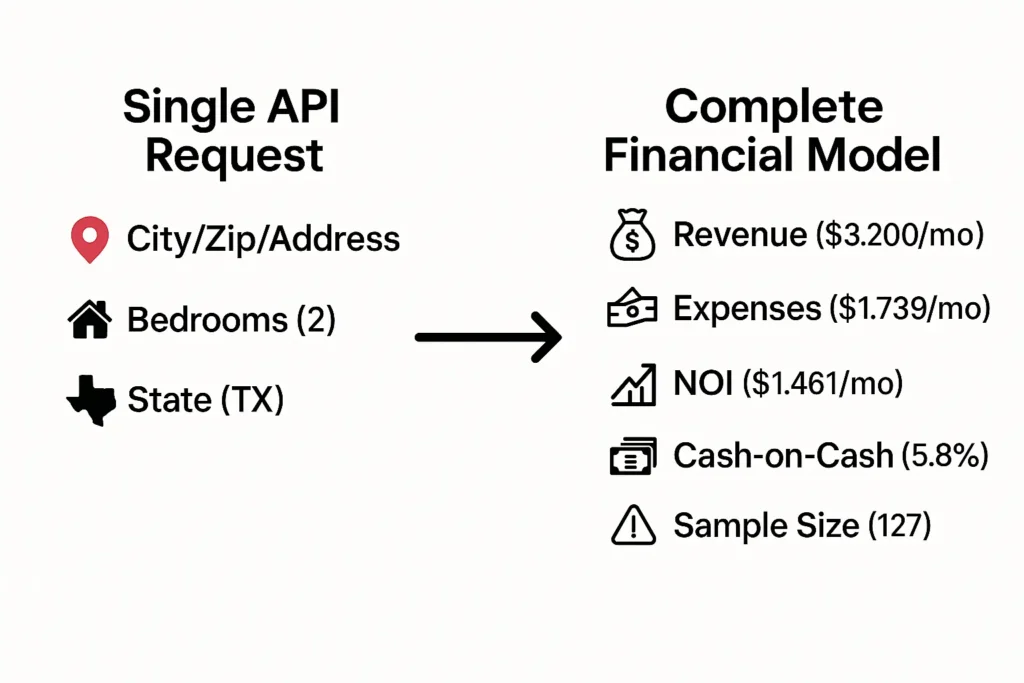
In essence, Mashvisor’s Lookup API delivers a complete, production-grade data pipeline specifically tailored for Airbnb underwriting. A single request yields a wealth of pre-modeled financial data, including:
- Projected Revenue (monthly and annual)
- Occupancy Rates
- Average Daily Rate (ADR)
- Revenue Per Available Room (RevPAR)
- Itemized Expenses
- Net Operating Income (NOI)
- Cash Flow
- Cash-on-Cash Return
- Sample-size and data-quality indicators
The accompanying guide demonstrates how to leverage this comprehensive response to build a full revenue model, incorporate financing logic, implement statistical fallbacks for data reliability across different geographic levels (address, zip code, city), and ultimately generate investment-ready summaries suitable for sophisticated PropTech applications, automated valuation engines, and efficient underwriting workflows.
II. How the Lookup API Works
The operational mechanism of the Mashvisor Lookup API is designed for simplicity and efficiency. Developers interact with the API through straightforward requests, and in return, receive structured, actionable data.
A. Minimal API Request
Initiating a data retrieval from the Lookup API requires a minimal request, typically involving an API key for authentication and specific parameters to define the desired market and property characteristics. The example below illustrates a basic Python script using the requests library to fetch market data.
import requests

API_KEY = 'your_api_key'  # Replace with your actual API key
BASE_URL = 'https://api.mashvisor.com/v1.1/client/rento-calculator/lookup'

def get_market_data(params, api_key=None):
    """Fetch Airbnb market data from Mashvisor API."""
    headers = 'x-api-key': api_key or API_KEY
    response = requests.get(BASE_URL, params=params, headers=headers)
    response.raise_for_status()  # Raise an exception for bad status codes
    return response.json()
This function, get_market_data, takes a dictionary of parameters (params) and an optional API key. It constructs the request to the BASE_URL, includes the necessary x-api-key header, and returns the JSON response. The response.raise_for_status() method is crucial for error handling, ensuring that any unsuccessful API calls (e.g., due to invalid keys or server errors) are immediately flagged.
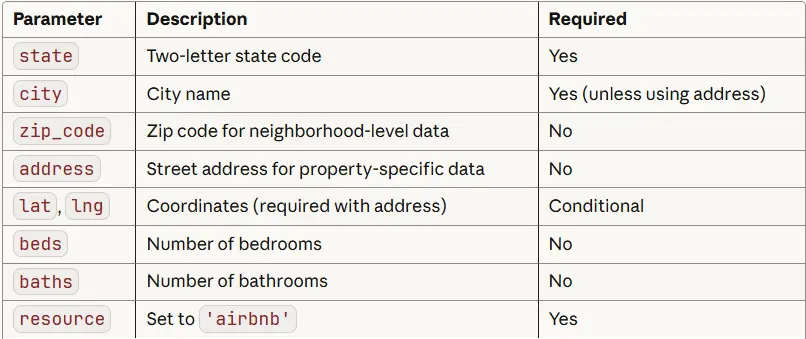
B. Supported Parameters
The flexibility of the Lookup API is further enhanced by its range of supported parameters, allowing for granular targeting of market data. These parameters enable users to specify criteria such as location (city, state, zip code, latitude/longitude), property type (e.g., "airbnb"), and the number of bedrooms and bathrooms.
The API supports analysis at various geographical levels:
- Address Level: Provides the most granular data when latitude and longitude are supplied. This level is ideal for evaluating specific properties but requires a sufficient sample size for statistical reliability.
- Zip Code Level: Offers data aggregated at the zip code level. This is a good intermediate option when address-level data is sparse.
- City Level: Aggregates data for an entire city, offering broader market insights. This is the coarsest level of analysis.
- State Level: Provides high-level market trends and performance metrics for an entire state.
The choice of analysis level is often dictated by the availability and reliability of the underlying data, which is where the API’s fallback mechanisms become invaluable.
C. How Often Is the Historical Dataset Refreshed?
A critical factor for any real estate data service is the freshness of its data. Mashvisor addresses this by updating its underlying dataset daily. This continuous refresh cycle ensures that the metrics provided through the API reflect the most current market conditions, including:
- Occupancy Trends: Daily updates capture shifts in how frequently properties are being booked.
- Pricing Movements: Real-time adjustments in nightly rates are incorporated.
- Short-Term Rental Supply: Changes in the number of available listings on major platforms are factored in.
This daily refresh means developers automatically receive the latest figures without any additional effort on their part, maintaining the accuracy and relevance of their revenue models. This commitment to data recency is paramount in the fast-paced short-term rental market.
III. Understanding the Lookup Response
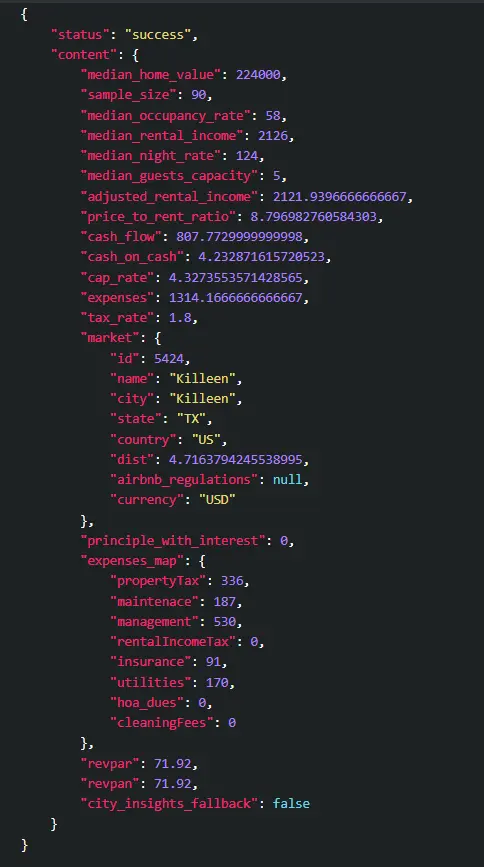
The data returned by the Lookup API is structured as a JSON object, designed to be easily parsed and integrated into downstream applications. The core information resides within the content field, which contains aggregated Airbnb metrics for the specified location and property type. Each entry within content typically represents a subgroup of comparable properties, often categorized by attributes like bedroom and bathroom configurations. This granular breakdown allows for a nuanced understanding of market performance.
A typical JSON response structure includes fields such as:
market: Details about the geographical market (city, state, ID).median_rental_income: The projected monthly rental income.median_occupancy_rate: The estimated percentage of booked nights.median_night_rate: The average nightly price.revpar: Revenue Per Available Room.expenses: Total estimated monthly operating expenses.median_home_value: The estimated market value of properties.cap_rate: Capitalization rate, a measure of profitability.cash_flow: Estimated net cash flow.cash_on_cash: Cash-on-cash return on investment.sample_size: The number of comparable properties used for calculation.data_quality: An indicator of the reliability of the data.expenses_map: A detailed breakdown of individual expense categories.
This structured output is the foundation upon which complete Airbnb revenue models are built.
IV. How to Build the Airbnb Revenue Model
Constructing a comprehensive Airbnb revenue model using the Lookup API response involves several key steps, focusing on extracting, calculating, and presenting financial data in a meaningful way.
A. Model Structure
A robust Airbnb revenue model typically comprises five core components, each drawing directly from the API’s output or derived through calculation:
- Property & Location Data: Essential details about the property’s physical attributes and its market context.
- Revenue Projections: Estimates of income generated from rental bookings.
- Expense Breakdown: An itemized list of operational costs.
- Profitability Metrics: Calculations of net income, returns, and cash flow.
- Data Quality Indicators: Information to assess the reliability of the underlying data.
B. Main Code: build_revenue_model()
The build_revenue_model() function serves as the central piece of logic for transforming the raw API response into a structured financial model. It orchestrates the extraction of data points and their organization into the five core components.
from datetime import datetime

def build_revenue_model(api_response, financing_params=None):
    """
    Build complete revenue model from Mashvisor lookup API data.

    Args:
        api_response: JSON response from Mashvisor /rento-calculator/lookup
        financing_params: Optional dict with down_payment_pct, interest_rate, loan_term

    Returns:
        Complete revenue model dict
    """

    if api_response.get('status') != 'success':
        raise ValueError("API request failed")

    content = api_response['content']
    market = content['market']
    expenses_map = content['expenses_map']

    # Handle potential typos or variations in expense names
    maintenance = (
        expenses_map.get('maintenance') or
        expenses_map.get('maintenace') or
        0
    )

    # Data quality threshold mapping (minimal version)
    _s = content.get('sample_size')
    if _s is None:
        dq = 'unknown'
    elif _s >= 80:
        dq = 'high'
    elif _s >= 30:
        dq = 'medium'
    elif _s >= 15:
        dq = 'low'
    else:
        dq = 'very_low'

    # 1. Property & Location Data
    model =
        'property':
            'location': f"market['city'], market['state']",
            'market_id': market['id'],
            'median_value': content['median_home_value'],
        ,

        # 2. Revenue Projections
        'revenue':
            'monthly_income': content['median_rental_income'],
            'annual_income': content['median_rental_income'] * 12,
            'nightly_rate': content['median_night_rate'],
            'occupancy_rate': content['median_occupancy_rate'],
            'revpar': content['revpar'],
            'guest_capacity': content['median_guests_capacity'],
        ,

        # 3. Expense Breakdown (all fields documented in expenses_map)
        'expenses':
            'monthly_total': content['expenses'],
            'annual_total': content['expenses'] * 12,
            'property_tax': expenses_map['propertyTax'],
            'maintenance': maintenance,
            'management': expenses_map['management'],
            'rental_income_tax': expenses_map['rentalIncomeTax'],
            'insurance': expenses_map['insurance'],
            'utilities': expenses_map['utilities'],
            'hoa_dues': expenses_map['hoa_dues'],
            'cleaning': expenses_map['cleaningFees'],
        ,

        # 4. Pre-Financing Profitability
        'profitability':
            'monthly_noi': content['median_rental_income'] - content['expenses'],
            'annual_noi': (content['median_rental_income'] - content['expenses']) * 12,
            'cap_rate': content['cap_rate'],
            'cash_flow_api': content['cash_flow'],  # from API
            'cash_on_cash_api': content['cash_on_cash'], # from API
        ,

        # 5. Data Quality Indicators
        'metadata':
            'sample_size': content.get('sample_size'),
            'data_quality': dq,  # replaced old good/moderate/low ternary
            'analysis_date': datetime.now().isoformat(),
            'price_to_rent_ratio': content.get('price_to_rent_ratio'),
            'regulations': market.get('airbnb_regulations'),
            'city_insights_fallback': content.get('city_insights_fallback'),


    # 6. Add Financing Layer (if provided) – this is your own logic, not API-dependent
    if financing_params:
        financing = calculate_financing(
            content['median_home_value'],
            financing_params['down_payment_pct'],
            financing_params['interest_rate'],
            financing_params.get('loan_term', 30)
        )

        model['financing'] = financing

        # Recalculate profitability with mortgage
        monthly_cash_flow = model['profitability']['monthly_noi'] - financing['monthly_payment']
        annual_cash_flow = monthly_cash_flow * 12

        model['profitability'].update(
            'monthly_cash_flow': monthly_cash_flow,
            'annual_cash_flow': annual_cash_flow,
            'cash_on_cash_return': (
                (annual_cash_flow / financing['total_invested']) * 100
                if financing['total_invested'] > 0 else None
            ),
            'break_even_months': (
                financing['total_invested'] / monthly_cash_flow
                if monthly_cash_flow > 0 else None
            )
        )

    return model
Full Implementation
The provided build_revenue_model function includes all necessary field mappings, defensive checks for missing data, and integrates optional financing logic. It meticulously extracts data points from the API response, categorizing them into the predefined structure of the model dictionary. Notably, it includes logic to handle potential variations in expense naming (e.g., "maintenance" vs. "maintenace") and a clear system for classifying data quality based on sample_size.
C. How the Model Works
The build_revenue_model function operates by systematically processing the API response:
- Revenue: Directly uses
median_rental_incomefrom the API for monthly and annual income projections. Themedian_night_rateandmedian_occupancy_rateare also directly mapped. - Expenses: Leverages the
expenses_mapfield to provide an itemized breakdown of monthly and annual operating costs, including property tax, maintenance, management fees, insurance, utilities, HOA dues, and cleaning fees. - Profitability: Calculates Net Operating Income (NOI) by subtracting total monthly expenses from monthly rental income. It also incorporates the
cap_rate,cash_flow, andcash_on_cashdirectly provided by the API. - Financing Layer (Optional): If
financing_paramsare provided, the function callscalculate_financingto determine mortgage details and then recalculates profitability metrics (monthly/annual cash flow, cash-on-cash return, break-even timeline) to reflect the impact of debt financing. - Metadata: Captures crucial data quality indicators, including
sample_size, a deriveddata_qualitylevel, theanalysis_date,price_to_rent_ratio, and any availableregulationsorcity_insights_fallbackinformation.
V. Revenue Model Inputs
The accuracy and reliability of the revenue model are directly tied to the quality of the input metrics provided by the Lookup API. Key revenue-related inputs include:
median_rental_income: This is the cornerstone of revenue projection, representing the typical monthly income derived from historical booking patterns for comparable properties.median_night_rate: The average price charged per night, a fundamental component in calculating potential revenue.median_occupancy_rate: This metric signifies the percentage of nights a property is expected to be booked within a given period. For example, a 65% occupancy rate translates to approximately 237 booked nights per year.revpar(Revenue Per Available Room): Calculated as nightly rate multiplied by occupancy rate, RevPAR is a key performance indicator for comparing properties of different sizes and demand levels. A higher RevPAR generally suggests a stronger market position.median_guests_capacity: The maximum number of guests a property can accommodate directly influences its pricing potential and target renter demographic.
VI. Expense Model Inputs
Understanding and accurately modeling expenses is critical for determining the true profitability of an Airbnb investment. The Lookup API provides essential data for this purpose:
A. Core Expense Categories
The expenses_map field within the API response offers a detailed breakdown of typical monthly expenses for short-term rentals:
propertyTax: Based on local tax rates and the property’s assessed value, this is a significant recurring cost.management: Typically ranges from 20-25% of gross revenue, reflecting the fees for professional property management services.maintenance: Estimated at approximately 1% of the property value annually. Short-term rentals often experience higher wear and tear compared to traditional rentals, necessitating a more robust maintenance budget (potentially 2-3% of property value annually).insurance: Covers property and liability risks associated with short-term rentals.utilities: Includes costs for electricity, gas, water, and internet services, which are typically borne by the host in short-term rentals.hoa_dues: Homeowners Association fees, applicable to properties within managed communities.cleaningFees: The cost of professional cleaning services between guest stays, a crucial element for maintaining guest satisfaction and operational efficiency.
B. What’s Not Included
It is important to note that the Mashvisor API, while comprehensive, does not inherently account for certain investor-specific costs. These typically need to be factored in separately by the developer or user:
- Mortgage Payments: If financing is involved, the principal and interest payments on the loan are not included in the API’s expense breakdown.
- Property Acquisition Costs: This includes expenses like closing costs, legal fees, and initial renovation or furnishing costs, which are one-time investments rather than recurring operating expenses.
- Capital Expenditures (CapEx): Major repairs or replacements of significant property components (e.g., roof, HVAC system) are not typically included in short-term operational expense models.
These costs must be added manually if building a complete investment calculator or financial projection.
VII. Financing Layer (Optional)
The inclusion of a financing layer significantly enhances the revenue model by providing a more realistic picture of an investor’s cash flow and return on investment.
A. What Financing Adds to the Model
Incorporating financing details allows for the calculation of:
- Mortgage Payments: The monthly principal and interest payments associated with a loan.
- Total Investment: The sum of the down payment and associated closing costs.
- Cash Flow After Debt Service: Net Operating Income minus mortgage payments, revealing the actual cash an investor can expect to receive.
- Cash-on-Cash Return: The annual cash flow after debt service, divided by the total initial investment, offering a key metric for evaluating leveraged returns.
- Break-Even Timeline: The time it takes for cumulative cash flow to recoup the initial investment.
B. Code: calculate_financing()
The calculate_financing function is a self-contained utility that computes mortgage-related figures based on standard financial formulas. It is independent of the Mashvisor API but designed to integrate seamlessly with the revenue model.
def calculate_financing(home_value, down_pct, interest_rate, loan_term=30):
    """Calculate mortgage and investment details (independent of Mashvisor)."""

    down_payment = home_value * (down_pct / 100)
    loan_amount = home_value - down_payment
    closing_costs = home_value * 0.03  # Assuming 3% closing costs

    monthly_rate = interest_rate / 12 / 100
    num_payments = loan_term * 12

    # Standard mortgage payment formula
    monthly_payment = loan_amount * (
        monthly_rate * (1 + monthly_rate) ** num_payments
    ) / ((1 + monthly_rate) ** num_payments - 1)

    return
        'down_payment': down_payment,
        'loan_amount': loan_amount,
        'closing_costs': closing_costs,
        'total_invested': down_payment + closing_costs,
        'monthly_payment': monthly_payment,
        'interest_rate': interest_rate,
        'loan_term': loan_term,
This function takes the property’s value, down payment percentage, interest rate, and loan term to calculate the down payment, loan amount, estimated closing costs, total initial investment, and the monthly mortgage payment.
C. How Financing Integrates
When financing parameters are provided to build_revenue_model, the calculate_financing function is invoked. The resulting financing details are added to the model dictionary under the financing key. Subsequently, the profitability section of the model is updated to reflect the impact of the mortgage payment on monthly and annual cash flow, and to compute the leveraged cash-on-cash return and break-even timeline.
VIII. Data Quality, Sample Size Rules, and Fallback Logic
Ensuring the statistical reliability of the data is paramount for building trustworthy investment models. The Mashvisor Lookup API incorporates mechanisms to address this, particularly through sample size thresholds and fallback logic.
A. Sample-size Thresholds and Why They Matter
The reliability of median-based metrics is directly proportional to the number of data points (comparable properties) used in their calculation. Mashvisor defines specific, conservative thresholds for different geographical resolutions to ensure statistical significance:
- Address Level: Requires a minimum of 15 comparable properties for reliable insights.
- Zip Code Level: Requires at least 30 comparable properties.
- City Level: Ideally requires 80 or more comparable properties for high confidence.
When a resolution’s sample_size falls below its threshold, the model should automatically "fall back" to the next coarser geographical resolution (e.g., from address to zip code). Simultaneously, a data-quality warning should be presented to the user, indicating that the insights are derived from a less granular, potentially less precise data set. This approach mitigates the risk of making decisions based on unstable or unrepresentative medians.
B. Fallback Logic (Address → Zip → City)
The fallback mechanism follows a clear hierarchical flow:
- Address-Level: The API first attempts to retrieve data at the most granular level, using latitude and longitude. If the
sample_sizeis 15 or greater, this data is used. - Zip-Level: If the address-level
sample_sizeis less than 15, the API falls back to querying data based on the zip code. If thesample_sizeat this level is 30 or greater, it is used. - City-Level: If the zip code-level
sample_sizeis less than 30, the API makes a final fallback to the city level (requiring state and city information). While city-level data is returned, a warning is surfaced if thesample_sizeis below 80, indicating lower confidence.
This tiered approach ensures that users always receive data, but with appropriate transparency regarding its statistical reliability.
C. Code: Fallback Function
The validate_and_fetch_data function implements this fallback logic, ensuring that the most reliable data available for a given location is retrieved.
# Assume get_market_data function is defined as above

def validate_and_fetch_data(location, api_key):
    """
    Fetch data with automatic fallback for low sample sizes.

    Resolution thresholds (conservative):
      - Address-level: require sample_size >= 15
      - Zip-level:     require sample_size >= 30
      - City-level:    require sample_size >= 80 (top confidence)

    Returns:
        (response_json, resolution_str) where resolution_str is one of
        'address-level', 'zip-level', 'city-level'
    """
    # Address-level first (if coordinates are provided)
    if 'lat' in location and 'lng' in location:
        response = get_market_data(location, api_key)
        content = response.get('content') or
        if content.get('sample_size', 0) >= 15:
            return response, 'address-level'
        # log fallback intent
        print(f"[data-quality] address comps=content.get('sample_size', 0) < 15. Falling back to zip-level.")

    # Fall back to zip code level (if provided)
    if 'zip_code' in location:
        zip_params = k: v for k, v in location.items() if k not in ['address', 'lat', 'lng']
        response = get_market_data(zip_params, api_key)
        content = response.get('content') or
        if content.get('sample_size', 0) >= 30:
            return response, 'zip-level'
        print(f"[data-quality] zip comps=content.get('sample_size', 0) < 30. Falling back to city-level.")

    # Final fallback: city level (state + city required)
    city_params =
        'state': location.get('state'),
        'city': location.get('city'),
        'beds': location.get('beds'),
        'resource': location.get('resource', 'airbnb')

    response = get_market_data(city_params, api_key)
    content = response.get('content') or

    # Return city-level response in all cases, but callers/UI should surface a warning
    # if sample_size < 80 (city-level is less reliable below this threshold).
    if content.get('sample_size', 0) < 80:
        print(f"[data-quality] city comps=content.get('sample_size', 0) < 80. Display low-confidence warning to user.")
    return response, 'city-level'
Full Implementation
The full implementation of validate_and_fetch_data includes robust error handling, logging of fallback events, and clear return values indicating the resolution level used. This allows the calling application to present appropriate warnings or adjust its analysis based on the data’s statistical confidence.
D. When to Display Warnings
User-facing warnings should be strategically displayed based on the derived data_quality level:
- Very Low: Requires explicit, prominent warnings about severe data limitations.
- Low: Suggests caution and advises users to consider fallback options or conduct further validation.
- Medium: Indicates that insights are directional but may not be highly precise; additional validation is recommended.
- High: Represents the highest confidence level, where warnings are generally not necessary.
Pro Tip: Always provide a visual indicator (e.g., an icon, banner, or highlighted text) for very_low, low, and medium data quality levels. This ensures users are consistently informed about the reliability of the presented financial metrics.
IX. Final Output Formatting
To make the complex financial data easily digestible for end-users, a clear and concise summary format is essential. The format_revenue_summary function transforms the structured model dictionary into a human-readable output.
A. Code: format_revenue_summary()
This function takes the model dictionary and constructs a formatted string, incorporating all key financial metrics, financing details (if applicable), and data quality indicators. It includes logic to derive the data quality label if not directly present and to generate specific warning messages based on the quality assessment.
def format_revenue_summary(model):
    """Create readable summary of revenue model"""

    price_to_rent = model['metadata'].get('price_to_rent_ratio')
    regulations = model['metadata'].get('regulations')

    # NEW: compute sample-size quality label (use model label if present)
    sample_size = model['metadata'].get('sample_size')
    quality = model['metadata'].get('data_quality')
    if not quality:
        if sample_size is None:
            quality = 'unknown'
        else:
            try:
                _s = int(sample_size)
            except (TypeError, ValueError):
                quality = 'unknown'
            else:
                if _s >= 80:
                    quality = 'high'
                elif _s >= 30:
                    quality = 'medium'
                elif _s >= 15:
                    quality = 'low'
                else:
                    quality = 'very_low'

    # NEW: prepare explicit warning text based on quality
    warning_lines = []
    if quality == 'very_low':
        warning_lines.append(f"  ⚠️ Data quality: VERY LOW — insufficient comps at this resolution. Consider a coarser geographic level.")
    elif quality == 'low':
        warning_lines.append(f"  ⚠️ Data quality: LOW — medians may be unstable; use caution or fall back to zip/city analysis.")
    elif quality == 'medium':
        warning_lines.append(f"  ⚠️ Data quality: MEDIUM — directional insights only; consider additional validation.")
    # 'high' -> no warning line

    # ORIGINAL FSTRING (with minimal edits to inject quality + warnings)
    return f"""
'*'*60
     AIRBNB REVENUE MODEL      '*'*60

💡 PROPERTY
    Location: model['property']['location']
    Market ID: model['property']['market_id']
    Median Value: $model['property']['median_value']:,0f

📈 REVENUE PROJECTIONS
    Monthly Income:     $model['revenue']['monthly_income']:,.0f
    Annual Income:      $model['revenue']['annual_income']:,.0f
    Nightly Rate:       $model['revenue']['nightly_rate']:.0f
    Occupancy Rate:     model['revenue']['occupancy_rate']%
    RevPAR:             $model['revenue']['revpar']:.2f
    Guest Capacity:     model['revenue']['guest_capacity'] guests

💸 MONTHLY EXPENSES
    Total:              $model['expenses']['monthly_total']:,.0f
    ├── Property Tax:     $model['expenses']['property_tax']:,.0f
    ├── Management:       $model['expenses']['management']:,.0f
    ├── Maintenance:      $model['expenses']['maintenance']:,.0f
    ├── Insurance:        $model['expenses']['insurance']:,.0f
    ├── Utilities:        $model['expenses']['utilities']:,.0f
    ├── HOA Dues:         $model['expenses']['hoa_dues']:,.0f
    └── Cleaning:         $model['expenses']['cleaning']:,.0f

💰 FINANCING' ' if 'financing' in model else ''
'    Down Payment (:.0f%): $:,.0f'.format(
        model['financing']['down_payment'] / model['property']['median_value'] * 100,
        model['financing']['down_payment']
    ) if 'financing' in model else ''
'    Loan Amount:          $:,.0f'.format(model['financing']['loan_amount']) if 'financing' in model else ''
'    Monthly Mortgage:     $:,.0f'.format(model['financing']['monthly_payment']) if 'financing' in model else ''
'    Interest Rate:        %'.format(model['financing']['interest_rate']) if 'financing' in model else ''

📊 PROFITABILITY
    Monthly NOI:        $model['profitability']['monthly_noi']:,.0f
'    Monthly Cash Flow:      $:,.0f'.format(model['profitability'].get('monthly_cash_flow', 0)) if 'financing' in model else ''
'    Annual Cash Flow:     $:,.0f'.format(model['profitability'].get('annual_cash_flow', 0)) if 'financing' in model else ''
    Cap Rate:           model['profitability']['cap_rate']%
'    Cash-on-Cash Return:  :.1f%'.format(model['profitability'].get('cash_on_cash_return', 0)) if 'financing' in model else ''
'    Break-Even Timeline:   months'.format(int(model['profitability']['break_even_months'])) if 'financing' in model and model['profitability'].get('break_even_months') else ''

⭐ DATA QUALITY
    Sample Size:        sample_size
    Data Quality:       quality.title() if isinstance(quality, str) else 'N/A'
    Price-to-Rent Ratio: f'price_to_rent:.1f' if price_to_rent is not None else 'N/A'
f'  ℹ️ Regulatory Note:    regulations' if regulations else ''

(chr(10).join(warning_lines) + chr(10)) if warning_lines else ''Generated: model['metadata'].get('analysis_date')
Data Source: Mashvisor API
'*'*60
"""
B. Complete Usage Example
This example demonstrates how to tie all the components together: fetching data, building the model, and formatting the output.
# Define location and financing parameters
location = {
    'state': 'TX',
    'city': 'Austin',
    'zip_code': '78701',
    '